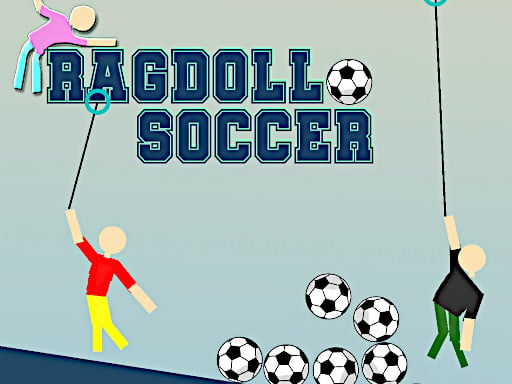
Playing Ragdoll Soccer unblocked takes one click: press Kick off above, wait out the short ad that funds the free version, and you are on the pitch. No download, no installer, no account — the whole game runs in this page's browser window. This page is a side entrance into Ragdoll Soccer, the game's home. Below: what "unblocked" means here, the keys you need, and what to expect.
What does "unblocked" actually mean?
People search for unblocked games from school and office networks whose filters decide which websites open. "Unblocked" does not name a special edition — there is no altered Ragdoll Soccer here. You get the developer's own title, RHM Interactive's physics soccer game, embedded through its official distribution network. What works in a classroom is the delivery: it is an HTML5 browser game, nothing needs installing, and the game lives behind one ordinary web address a standard browser can open.
How to play Ragdoll Soccer unblocked at school
- Open this page in any modern browser on a computer you are allowed to use.
- Press the orange Kick off button on the game screen above.
- Let the short advertisement finish — it is what keeps the game free.
- Pick 1 Player and work through the ten puzzle levels.
- If the pitch feels small, hit Fullscreen under the player and the game takes the whole screen.
One honest caveat: no website can promise that every school network will let every page through — filters sit between your computer and the internet, and your school sets them. What we can promise is the list above: nothing to download, no account, and a game that starts with one click the moment the page is reachable.
Does it work on a Chromebook?
Yes. Any computer that runs a modern browser and has a physical keyboard can run the game, and a Chromebook is exactly that: a browser with keys attached. The controls are keyboard-only — no mouse aiming, no touch controls. The distribution network lists the game as a desktop title rather than a mobile one, and that is the honest summary: a phone has no keyboard to swing with, so a school Chromebook, a laptop or a desktop is the right tool.
Ragdoll Soccer controls
The developer's own instruction sheet lists one set of keys for the solo puzzle mode:
| Action | Key |
|---|---|
| Move your footballer | W, A, S, D |
| Release / launch the rope | Space bar |
That is the complete control set. W pulls up, S drops down, A and D swing you left and right, and the space bar lets go of the rope at whatever moment you choose — which is where all the skill lives. Those keys are for solo play; for the two-player keys on one keyboard, the Ragdoll Soccer 2 Player guide has the full match setup.
How the game actually plays
Ragdoll Soccer is a physics based soccer game played for comedy. Your footballer hangs from a rope like a wrecking ball with cleats. Pull back to build a swing, release to launch, and a limp-limbed human projectile flies at the ball. The stated goal is to stay in one piece and score to win; in practice, pieces do go missing and the game carries on regardless, because the ball does not care how many joints you still own. The 1 Player mode strings ten puzzle levels together, each arranging obstacles between you and the goal so that a straight launch almost never works and a ridiculous one usually does.
Tips for scoring while staying (mostly) in one piece
- Build the swing before you let go. Launch power comes from the pull-back, not from luck — a bigger arc throws farther.
- Time the release. Letting go at the bottom of the swing drives the ball flat and hard; releasing near the top of the arc lifts it over blockers.
- Take it easy in tight levels. A short, gentle pull usually beats a full-power launch that sends your footballer into orbit while the ball sits still.
- Use Fullscreen on small screens. Judging an arc is easier when the pitch fills the display — the button sits right under the game.
- Expect wreckage. You can score with an arm missing. If the ball crosses the line, the goal counts, however you look afterwards.
Why play it on this page
The game here is free, funded by the short ad you already met, with no sign-up at any point. You get fullscreen, a like button, and a comments section where players trade goals and disasters. For the full manual — the same player with a longer guide — the game's home page is Ragdoll Soccer, also one click away in the breadcrumb.
Ragdoll Soccer unblocked: questions players ask
Is Ragdoll Soccer unblocked at school?
Nothing on this site blocks you: the game loads in your browser with no download, no install and no account. Whether the page opens on a school network is decided by the filter your school runs. If game sites are reachable on your network, you can play; if they are not, this page cannot change that.
Do I need to download or install anything?
No. Ragdoll Soccer is an HTML5 browser game served through its official distribution network. You press Kick off, wait through the short ad that funds the free version, and play. Nothing to uninstall afterwards, either.
Does it work on a Chromebook?
Yes. Any computer with a modern browser and a keyboard can run it, Chromebooks included. It is a keyboard game — WASD to move, space bar to release the rope — and its network lists it as a desktop title rather than a mobile one.
Is Ragdoll Soccer unblocked free to play?
Yes. There is no payment and no sign-up. A short advertisement plays before the game loads, and that is how the free version is funded. If the page is reachable on your network, the game itself costs nothing.
What are the controls for Ragdoll Soccer unblocked?
Move with W, A, S and D, and press the space bar to release the rope and launch your footballer at the ball. That is the full set of keys the developer lists for the 1 Player puzzle mode.